The login page is finished and its tests are passing.
Everyday work conversations…
One payment callback test still fails. More investigation is needed.
Add the release documentation to the next steps.
···More agents
 1flowbaseSave conversations · build apps
Grow an application you can keep using!
Project progress report
Built from agent conversations · sample data
Done12
Needs attention3
Not started5
| Task | Status | Source | Updated |
|---|---|---|---|
| Login page | Done | Claude Code | 11-06 10:24 |
| Payment callback | Needs attention | Codex | 11-06 11:03 |
| Release docs | Not started | You | 11-06 11:20 |
| User feedback | In progress | Claude Code | 11-06 09:12 |
| Performance | Not started | More agents | 11-06 08:45 |
Task status overview · sample data
Done12/20 12
Needs attention3/20 3
Not started5/20 5
You configure client connections and what is recorded. These conversations are examples.
Claude CodeThe login page is finished and its tests are passing.
CodexOne payment callback test still fails. More investigation is needed.
YouAdd the release documentation to the next steps.
ReportsExtract useful data from conversations
Knowledge basesRetain team experience and knowledge
Business toolsBuild applications for your work
THREE PROTOCOLS. ONE GATEWAY.
Anthropic MessagesOpenAI Chat CompletionsOpenAI Responses
SYSTEM ARCHITECTURE
Two layered views: how it is used, and how it is built.
- L1ActorsWho uses itBusiness usersOperate apps within their permissionsAdminsConfigure models, access and workspacesAgentsCall exposed capabilities through MCPAI apps / SDKsUse 1flowbase as the model endpoint
- L2ChannelsWhere they enterGUI consoleReview and manage visuallyMCP / WebMCPProgressive list / get / callCompatible model APIsAnthropic Messages · OpenAI Chat / Responses
- L3ApplicationsWhat you build (examples)Knowledge baseOrganize reusable knowledgeBusiness toolsTools built on your own dataReportsAggregate and present dataUsage analyticsAnalyze model and token usage
- L4PlatformWhat 1flowbase providesAI GatewayProtocol translation · dispatch · chat logsApplication backendData models · CRUD APIs · workflowsReact BlocksNative React / TSX interface blocks
- L5ResourcesWhat gets usedModel providersOpenAI · Anthropic · Gemini · DeepSeek …Business dataData you define and manageConversation recordsRetained and accessed as configuredFilesUploads and attachments
Top to bottom: actors use applications through channels, applications are built on platform capabilities, and the platform dispatches underlying resources. Governance spans every layer. Applications are examples that require configuration and development.
- L1Frontendweb containerReact consoleReact 19 · antd 6 · TanStack Router · Zustand · ViteNginxStatic hosting · reverse-proxies /api to api-server
- L2Protocol adaptersapi-server · AxumHTTP / SSEREST and streaming responsesWebSocketLong-lived sessionsMCP / WebMCPAgent tool protocolsModel-compatible ingressAnthropic · OpenAI protocols
- L3Unified interfaceinterface-runtimeDefinition / BindingExactly one binding per endpointFrozen planRegistry snapshotAuth correlationImmutable call identityFinalizationCancel · timeout · bounded cleanup
- L4Application servicescontrol-planeUse casesBusiness decisions and state writesTransactions & auditNamed service commandsaccess-controlPermission catalog · roles · authorization
- L5Runtimeruntime-*runtime-coreRegistry · slot engine · six runtime portsorchestration-runtimeCompile and run · provider-routingruntime-extension-hostWorker and plugin process lifecycle
- L6Storage adaptersstorage/*Durablestorage-durable-postgres · SQL · migrationsEphemeralSessions / cache / leases · memory or RedisObjectBusiness file object storage driver
- L7Domain & contractsMost stable coredomainDomain objects · invariants · scopes*-contractsPort traits · wire types · error contracts
- L8InfrastructureExternal dependenciesPostgreSQL 18db container · durable and workflow stateUpstream model APIsReached through network egressFile volumesPersisted uploads
Dependencies only point downward to more stable layers, with no cycles (see api/crates/AGENTS.md in the repository). Cross-cutting concerns are assembled into each layer by the api-server composition root.
01 / BEYOND THE GATEWAY
The next layer of your AI stack.
Start with model access. Keep building on the capabilities and data you already own.
01
AI GatewayOne entry point for your AI.
Install provider plugins for OpenAI, Anthropic, Gemini, DeepSeek, Alibaba Cloud Bailian or any OpenAI-compatible API, and convert between three major AI protocols. Each gateway application gets its own keys, logs, monitoring and statistics.
02
WorkflowA model can be a whole workflow.
Route requests by model, fall back across branches, or combine models and tools into a new capability. Publish the workflow and call it like any other model.
03
Conversations & costEvery conversation becomes an asset.
Record each gateway conversation with its model, reasoning effort, status, tokens and cost in PostgreSQL. Reports break usage down by model and by user.
04
API-first backendBuild beyond the model call.
Define data models and data sources, expose CRUD APIs and schedule workflows. Every application publishes its own OpenAPI 3.1 document.
05
MCP GatewayGive agents a way into your system.
Discover tools progressively with list, get and call. Manage MCP instances, tool settings and third-party MCP servers from the console.
06
React pagesYour interface. Your React code.
Build pages from native React blocks, edit them in place with UI mode, and let the built-in AI assistant work on the page with you.
02 / COMPOSE INTELLIGENCE
The right model. For each part of the job.
Let a capable model plan and review. Delegate execution to a faster, lower-cost model. Publish the whole workflow as one virtual model.
Design your own trade-offs between capability, cost and speed. Actual results depend on the models and tasks you choose.
One API request
01
PlanPrimary model
02
ExecuteWorker model
03
ReviewPrimary model
One model endpoint
03 / SEE THE SYSTEM
A real workspace for your AI.
Orchestrate a gateway application, publish its API, track usage and cost, and build pages with an AI assistant. These are real interfaces from 1flowbase v0.5.0.
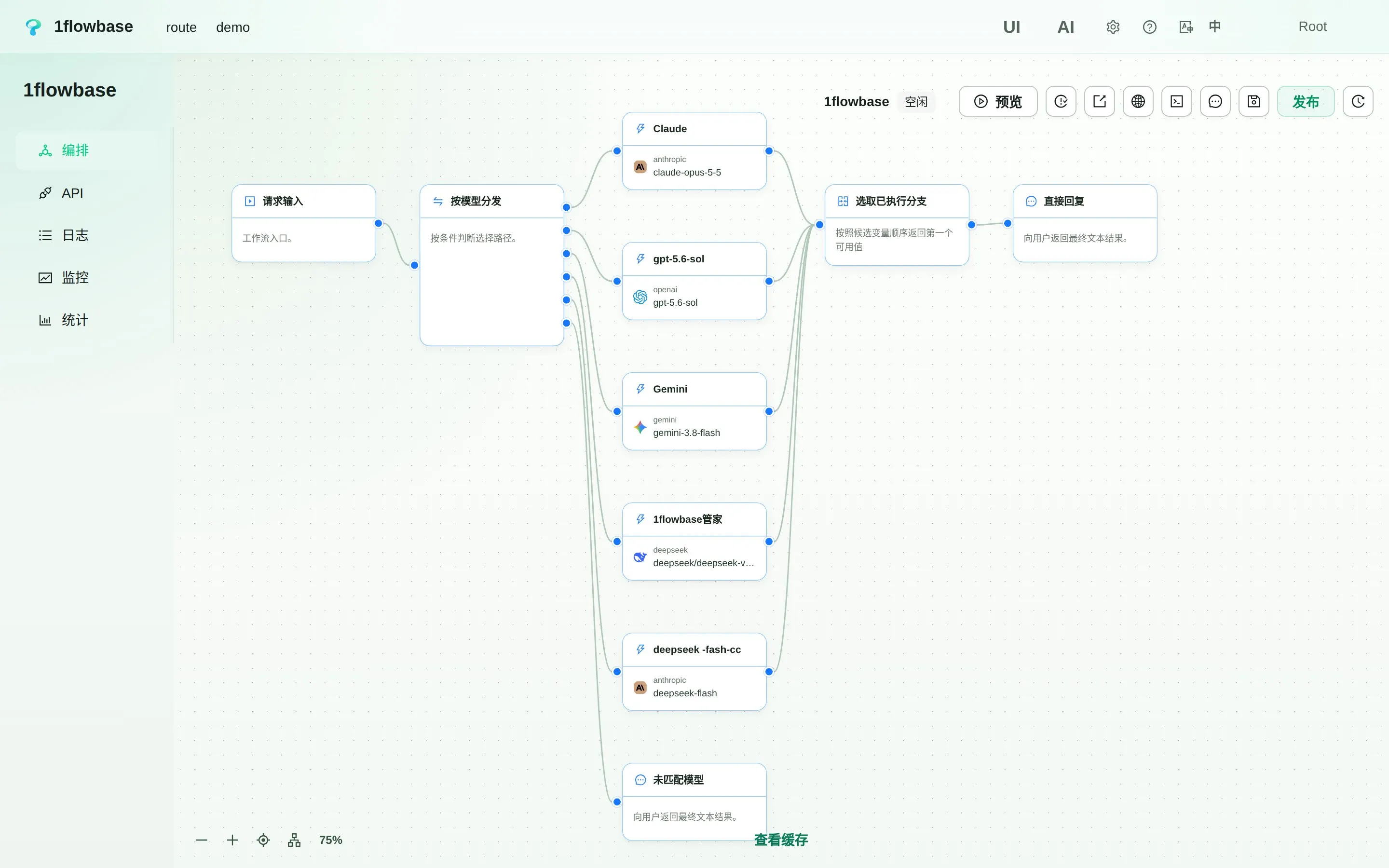
Workflow orchestration: route each request to Claude, GPT, Gemini or DeepSeek by model name, then return the first available branch result in order.
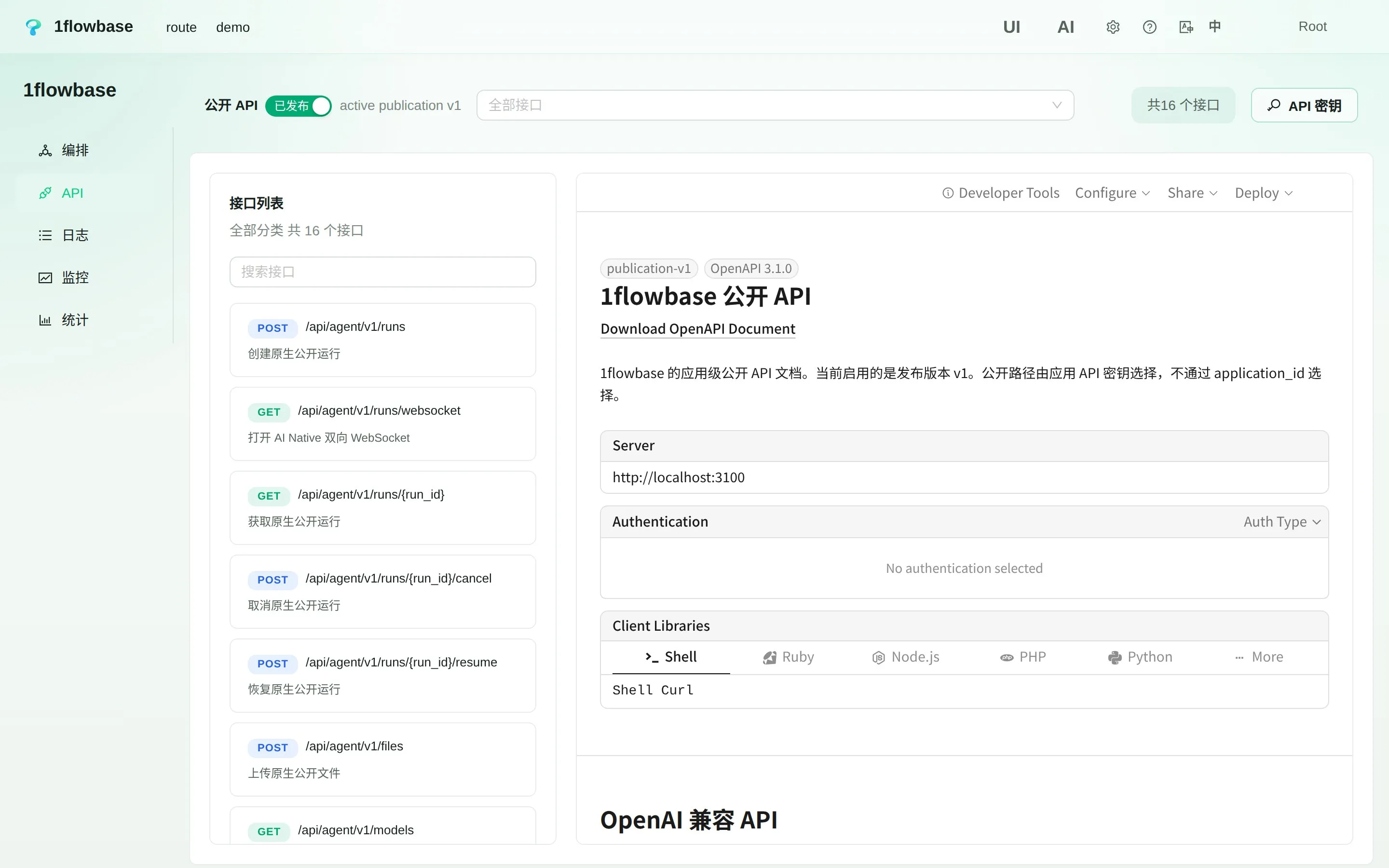
Public API: every application publishes OpenAI-compatible, Anthropic-compatible and native agent endpoints with an OpenAPI 3.1 document.
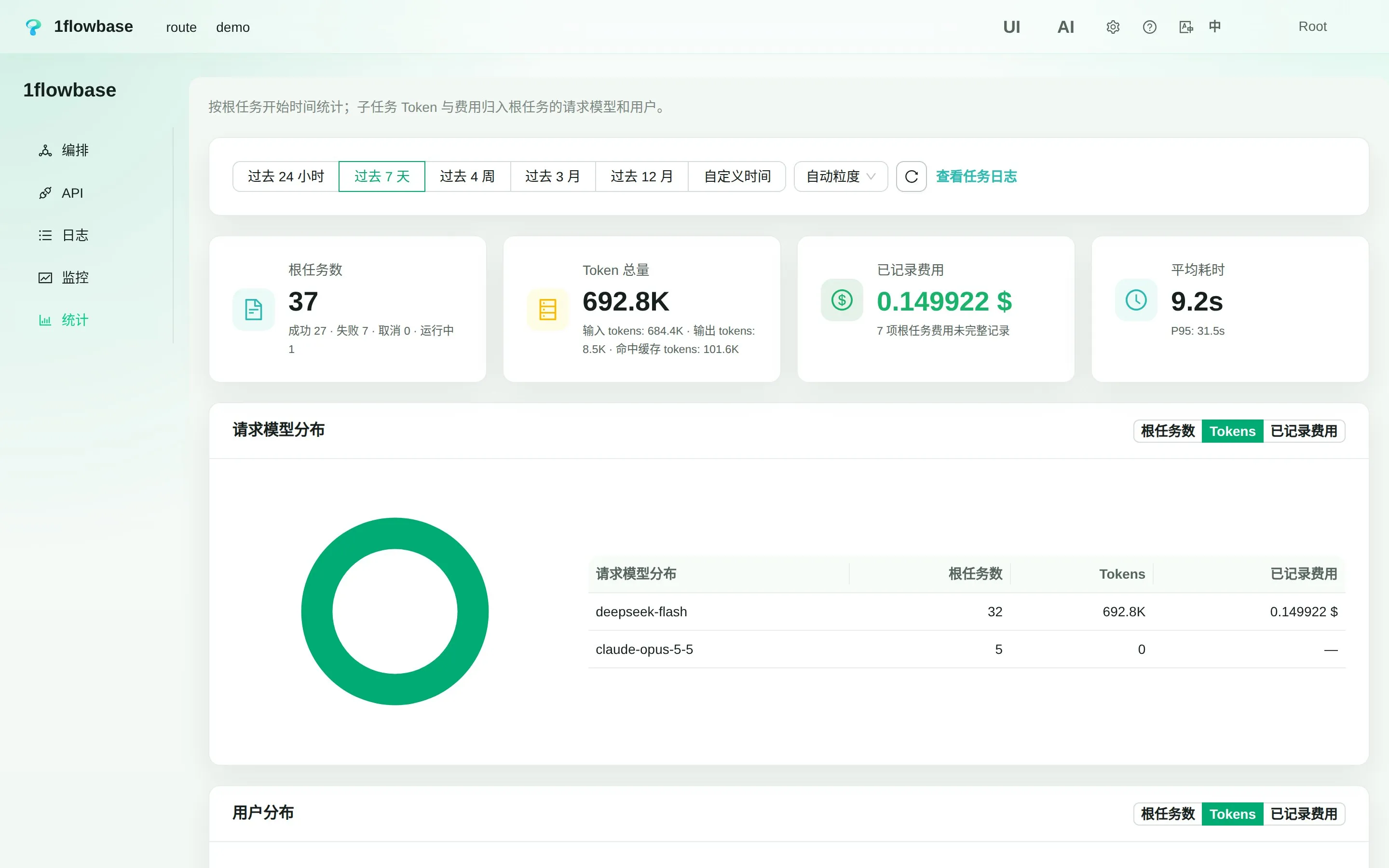
Statistics: task counts, token totals, recorded cost and latency, broken down by model and by user.
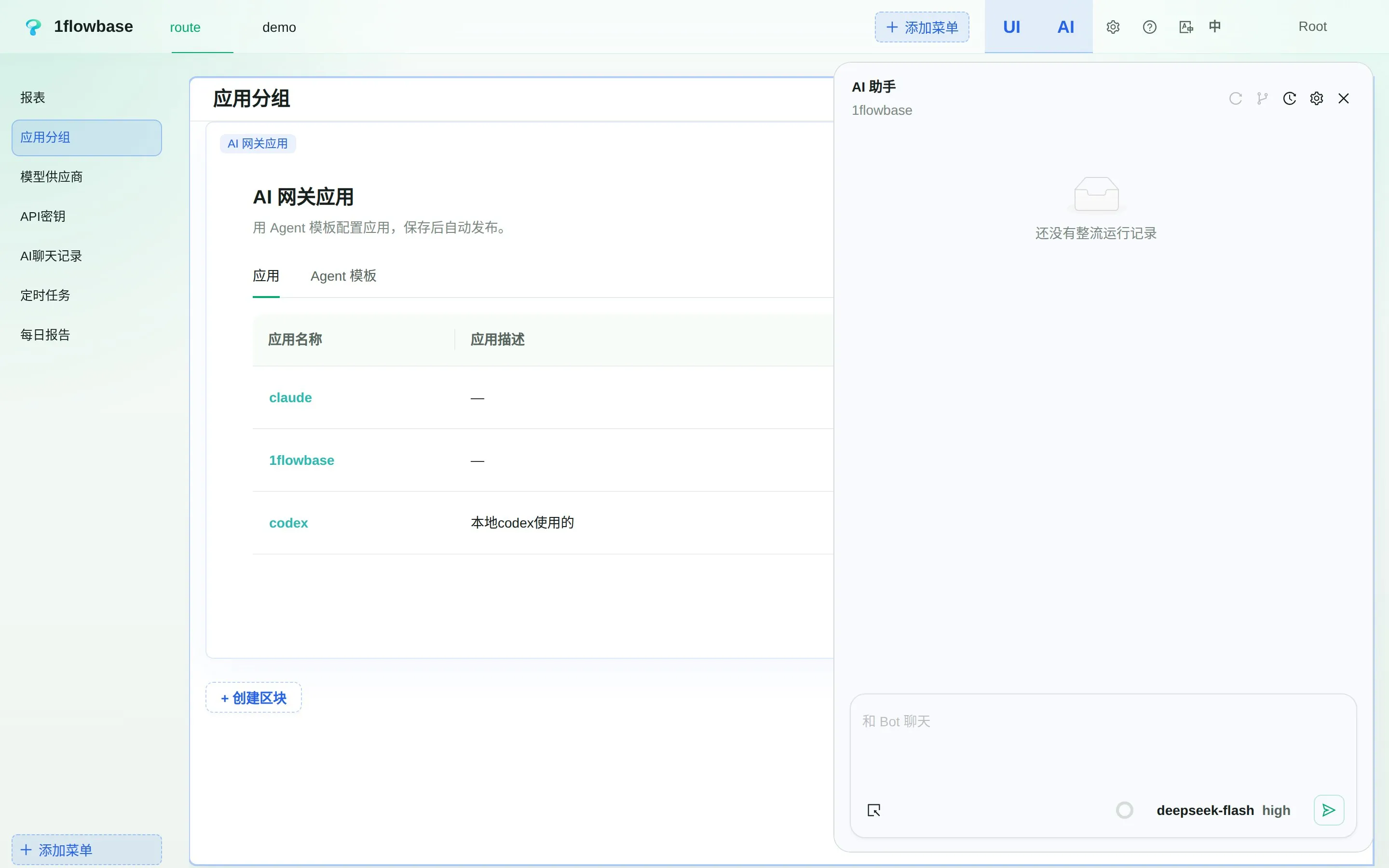
Pages and AI assistant: edit the console pages in UI mode while the built-in assistant works alongside you.
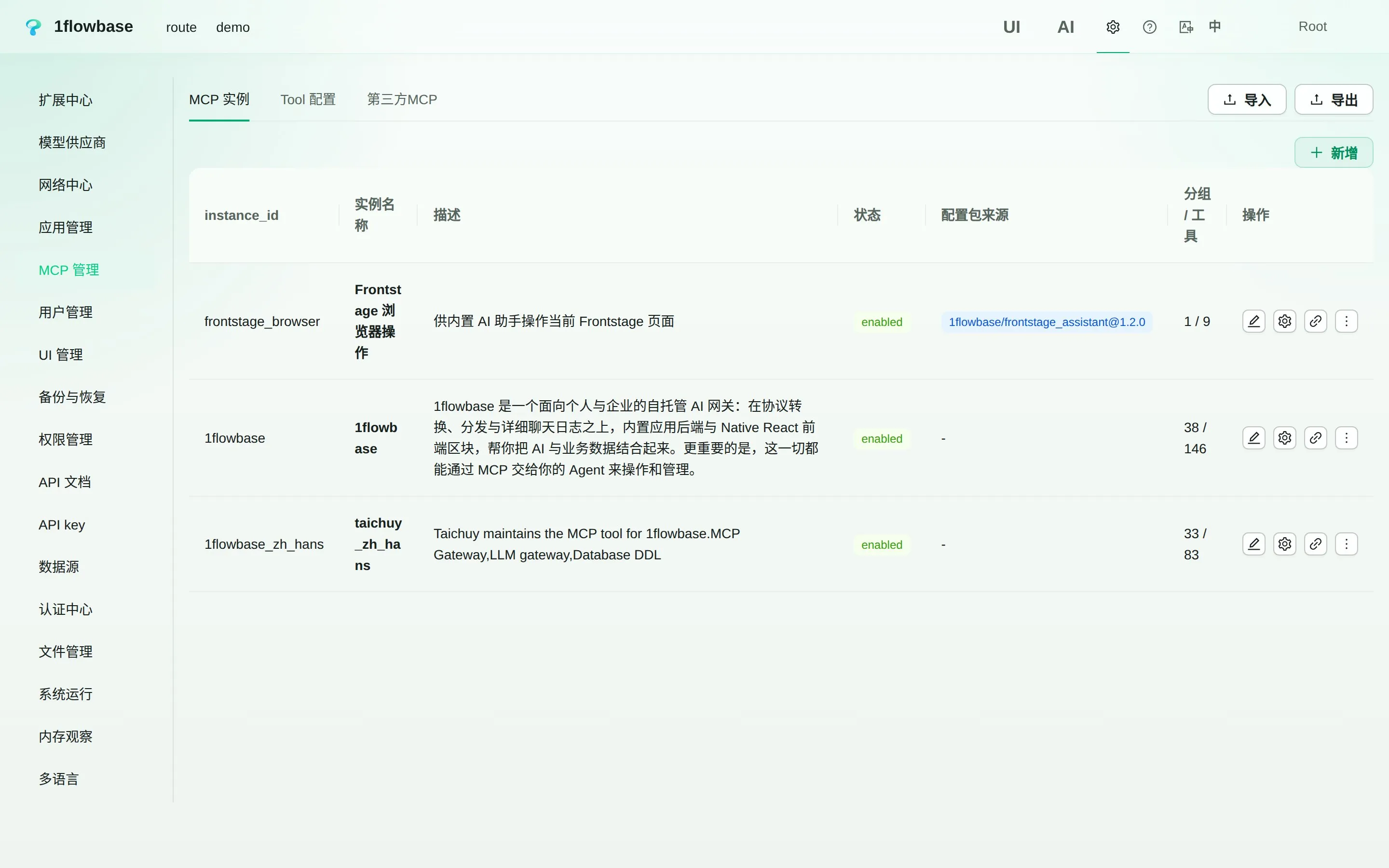
MCP management: MCP instances, tool settings and third-party MCP servers in one place.
BUILT FOR AGENTS
One system. Two ways to build.
People use the GUI and the built-in AI assistant. Agents reach the same API-first runtime through MCP. Your application becomes something both can work with.
Explore the docs01
list()Discover available tools
02
get()Read the definition you need
03
call()Use the capability
Built in the open. Still evolving.
The official 1flowbase MCP instance already groups more than a hundred tools by capability, and tool descriptions and defaults are still being refined. For complex applications, we currently recommend giving your coding agent the 1flowbase project context.
WHERE TO START
Your gateway to what comes next.
Enterprise AI teams
Unify model access across teams. Retain AI conversations and build internal applications on your own infrastructure.
AI product builders
Go from gateway to data, APIs, workflows and UI without treating each layer as a separate project.
Advanced individual users
Build your own model combinations, then use them through a familiar model API.
Practical guides
Find a next step for your application.
Start with a use case and an evaluation checklist before choosing what to build.
01
Browse all articlesEvaluate an AI gateway
Decide where a shared endpoint fits and test it with one real client.02Compose models and tools
Build reusable model behavior and inspect the calls behind it.03Investigate an AI run
Connect execution evidence to a review decision and a useful next step.START BUILDING
Your infrastructure. Your next idea.
Deploy with the official Docker script. Follow its setup prompts, then connect your first model.
Read the setup guidesbash
curl -fsSL https://raw.githubusercontent.com/taichuy/1flowbase/main/scripts/shell/docker-deploy.sh | shpowershell
irm https://raw.githubusercontent.com/taichuy/1flowbase/main/scripts/powershell/docker-deploy.ps1 | iexcmd
powershell -NoProfile -ExecutionPolicy Bypass -Command "irm https://raw.githubusercontent.com/taichuy/1flowbase/main/scripts/powershell/docker-deploy.ps1 | iex"Requires Docker and access to your chosen model providers. Review the script before running it.
FAQ
A few things worth knowing.
What is 1flowbase?
1flowbase is an open-source, self-hostable AI Gateway and AI application runtime. It connects model access, workflows, conversation data, APIs, business data, MCP and React interfaces.
Which AI protocols are supported?
1flowbase converts between Anthropic Messages, OpenAI Chat Completions and OpenAI Responses. Each application publishes /v1/messages, /v1/chat/completions, /v1/responses and /v1/models, plus a native agent API with WebSocket, cancel and resume. Both models and workflows can be published this way.
Where is my data stored?
PostgreSQL is the current primary data source. Gateway conversations are retained there, alongside your business data. Before production use, plan storage capacity, retention, backups and compliance for your workload.
Can an agent build a complete application?
The runtime is API-first and its capabilities are exposed through MCP, and the console includes a built-in AI assistant. The official tools and agent experience are still being improved. For complex applications, give your coding agent the project context rather than assuming fully autonomous setup.
Are application templates available?
Gateway applications can already be configured from Agent templates, and the extension center has a place for application templates. Ready-made business application templates are still in progress; they are not presented here as finished, one-click applications.
Is it free to use?
1flowbase is open source under Apache License 2.0. You provide the hosting, database and model-provider access; those may have their own costs.
Build with AI. Build for agents.
Start small. Keep the foundation open.